
TOTPRadius - Remote syslog configuration options
System Logging Protocol (Syslog) is a way network devices can use a standard message format to communicate with a logging server.It was designed specifically to make it easy for administrators to monitor network devices, also review and manage those logs.
Starting from TOTPRadius v0.2.9, it is possible to send logs to a Remote syslog server. This can be configured in Settings → Remote syslog server

The syslog message contains information about user enrollment , authentication attempt, and admin’s activity . The server should be specified in IP_OR_FQDN:PORT format. Messages will be sent via UDP only. Set this value to "none" to disable the feature.
Message examples:
July 14, 2022, 02:33:56 token2 TOTPRadius; Radius authentication request from testuser01 ; Client IP: 192.168.0.104
July 14, 2022, 02:33:56 token2 TOTPRadius; Authentication attempt for testuser01 ; Return value: Reject
July 14, 2022, 02:49:43 token2 TOTPRadius; Authentication attempt for testuser02 ; Return value: Accept
July 14, 2022, 02:53:17 token2 TOTPRadius; Admin action: IP:192.168.0.104; admin/; table :users; action: insert
July 14, 2022, 02:53:17 token2 TOTPRadius; Admin has added a user from the admin panel. Username: testuser03
Local syslog log file
Even if a remote syslog server is not specified, a copy of syslog messages is kept on the appliance locally. This log can be accessed from Settings → User actions log

About
Installation and configuration
- Installation and initial configuration
- Network configuration
- Migrating from older versions
- LDAP Configuration
- Azure AD Configuration
- Self-service enrollment portal
- Web and LDAPS Certificates
- Syslog configuration
- Single-factor authentication exceptions
- Slave appliance mode
- Dynamic RADIUS Attributes
Integration guides
Blog
14-07-2026
token2-fido-bridge: NFC and smartcard FIDO2 devices on Linux
 Linux does not allow using non-USB transport for FIDO2 natively. We're happy to announce token2-fido-bridge, a small open-source tool that finally lets browsers on Linux use FIDO2 credentials stored on NFC and contact smartcards for WebAuthn.
28-06-2026
Libre Key Companion: manufacturer-agnostic security key manager for Android and iOS
 We're happy to announce Libre Key Companion, a new open-source companion application for Android and iOS that lets you manage hardware security keys and smart cards from any manufacturer.
17-06-2026
An open-source, cross-platform way to manage your Token2 keys: Companion App - Rust edition
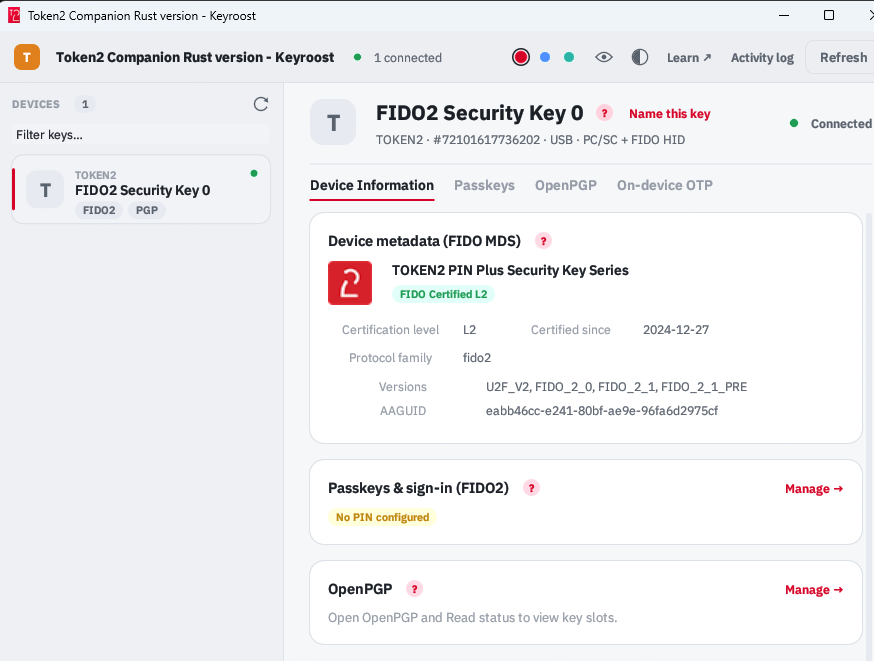 Token2 Companion - Rust edition - an open-source, cross-platform desktop tool for managing Token2 keys, and keys from other vendors too. It runs on Windows, macOS, and Linux, and the whole thing is open source: you can read it, audit it, build it, and extend it.